What's New in Marine Data Hub?
v4.1 - May 2026
Dialogue Email Participant Enhancement
This feature mitigates Dialogue Owners from adding Email address Participants to a Dialogue, where those email addresses are already associated with an existing Hub Organisation. This is to ensure the correct Hub Organisation(s) and (where relevant) User Group(s) are included in a Dialogue from the outset and that Dialogue and Report permissions and responsibilities are correctly managed at Hub organisation level. This feature provides a solution to previous undesirable circumstances such as:
- If a Report was assigned to an individual email address rather than the Hub Member organisation, the Report could only be completed using the link sent to that specific email address, and otherwise authorised users within the Hub organisation did not have access to the Report.
This feature:
-
Recognises when an email address is already associated with an existing Hub user account. If a user's email address is added to a Dialogue as an Email Participant, Hub automatically adds the Organisation instead and the email address is not included.
-
Allows Hub Administrators to optionally link other specific email addresses to their Organisation (and to a User Group, if User Groups are configured). If these linked email addresses are added to a Dialogue as Email Participants, Hub automatically adds the Organisation (& User Group, if applicable) instead and the email address is not included.
Example
A new dialogue is created and an email address is supplied for a participant:

However, this email address has been validated by and linked to the recipient organisation:

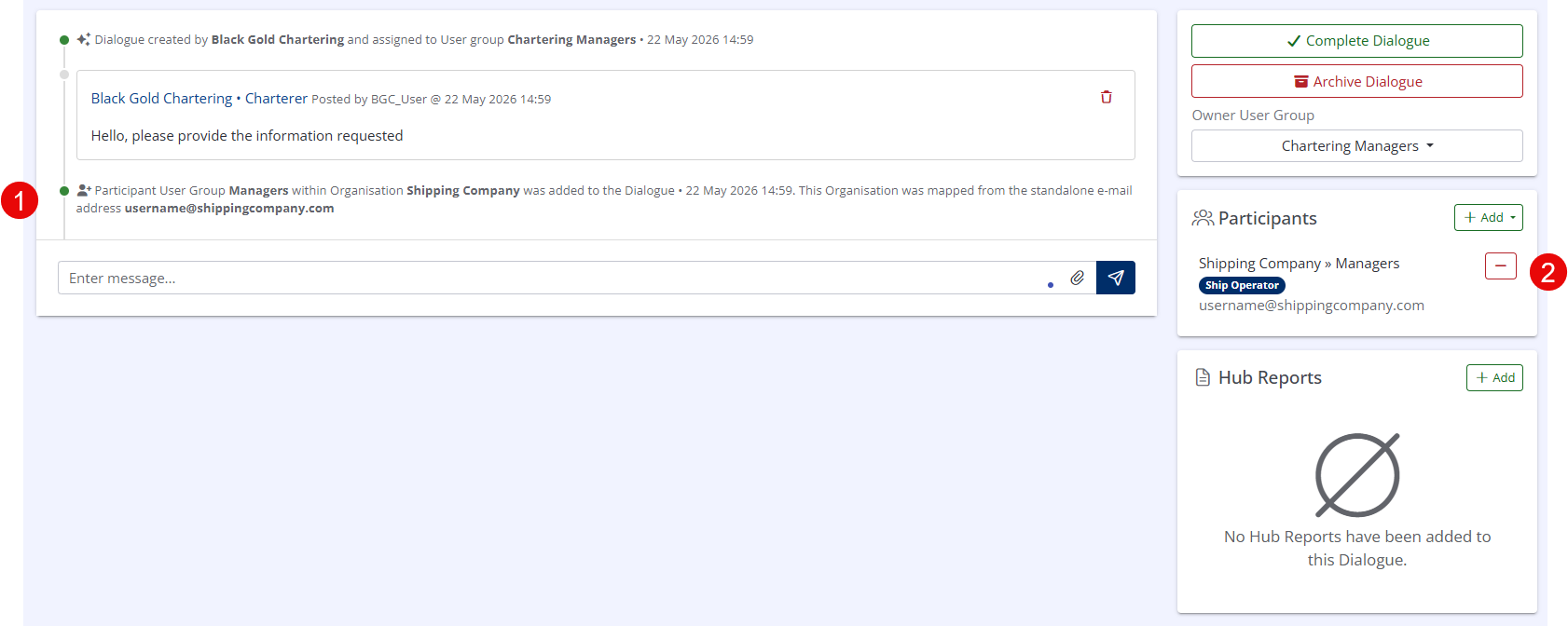
This results in the Hub Organisation being added to the Dialogue instead of the individual user, as indicated by: (1) The text in the Dialogue timeline explaining that the email address has been mapped to its associated ‘Shipping Company’ Organisation and ‘Managers’ User Group. (2) The Participants panel of the Dialogue, which explains the ‘Shipping Company’ Organisation and ‘Managers’ User Group’ have been added to the Dialogue and also shows the username@shippingcompany.com email address from which they were originally mapped.
Dialogue Owner Organisation Filter
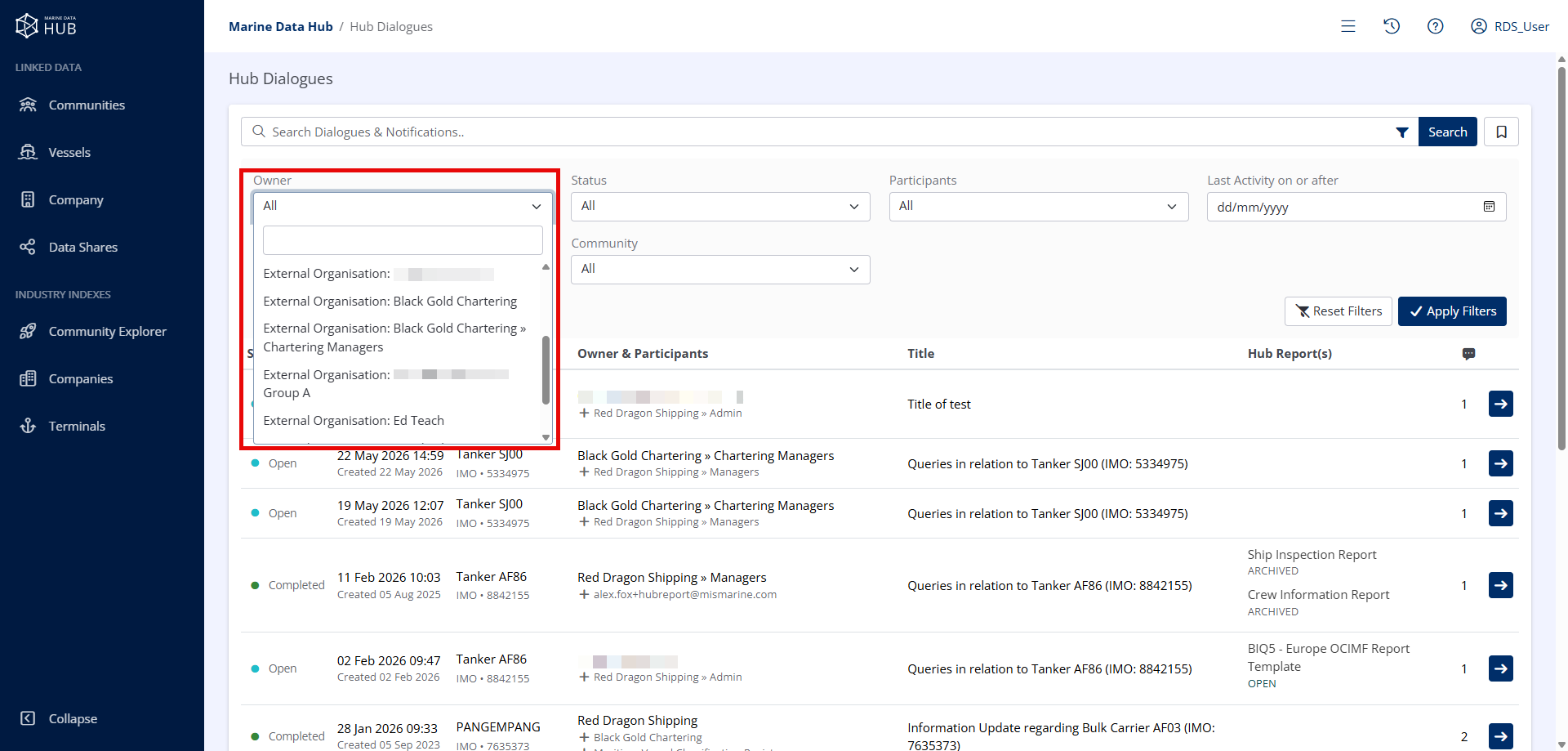
This feature allows the display of Hub Dialogues to be restricted by the Owner Organisation.
v4.0 - March 2026
Organisation-wide Alerts Processing
This feature provides the option to process alerts within the Alerts dashboard module across all of an organisation users, Therefore, if one of an organisation users processes an alert, it is also automatically processed for the remainder of that organisation users.
This setting is optional and is configured directly within the Hub interface from the Organisation Settings area, accessed by clicking on the Profile section in the upper-right corner of Hub.
Filter Dashboard and Indexes to Bookmarked Assets by Default
Users may now opt to show only Bookmarked Assets (Vessels, Terminals & Companies) by default.
Example: a Ship Operator might be the Technical Manager for many vessels, but an Organisation user might be responsible for a specific subset of Vessels and can opt to view only those Vessels by default.
For more information, see Manage Profile.
For more information on Bookmarking an Asset, see Bookmarking Records.
Automated Scheduling - Dialogue Completion & Report Archiving
For organisations managing a high volume of Dialogues, the Automated Scheduling feature removes the need to manually revisit and close older Dialogues or archive associated open data capture Reports.
This feature allows your organisation to define the time period after which Dialogues will be automatically completed and any associated Reports archived.
Configuration
- Customers with direct access to the Hub web platform can manage this configuration at any time via the Administration > Organisation Settings menu.
- Customers that access Hub via an integrating system such as MIS Mainstay Pro should contact Hub support.
Mainstay Pro Integration Enhancements
Info
Only applicable to MIS Mainstay Pro customers
As part of our ongoing efforts to enhance user experience, we've also made infrastructure enhancements to how Marine Data Hub communicates with integrated Mainstay Pro instances.
These updates will take effect when v8.2 is deployed to your Mainstay Production environment. The changes will mean that when a key activity takes place within Marine Data Hub Dialogues, your connected Mainstay account will be automatically notified as they happen, rather than waiting for scheduled synchronisation tasks to run.
v3.2 - October 2025
Bookmarking Records
Bookmarks are a convenient feature of Hub that allow users to locate Hub data (such as Hub Reports, Dialogues or Documents), based on their linked asset (Vessels, Companies or Terminals).